Design Progress
Translating our user needs into solutions through ideation. Design artifacts include design requirements, storyboards, interface design sketches, and an information architecture map.
Design Requirements
As a team, we came up with a set of design requirements. Before we started ideation, we wrote out requirements that any potential design must address, to best suit the user’s needs. Although we didn’t expect one product to address all ten design requirements, the list outlines the important features we should try to incorporate into our project.
Key Design Requirements
-
Allow users to contact a veterinarian for professional advice
-
Allows the user to stay informed about the activities of their pet
-
Allow the user to provide basic living essentials for the pet while they are away from home
-
Allow the user to provide interesting and safe activities for the pet while they are away from home
-
Alleviates separation anxiety of the pet while the user is away from home
Storyboards
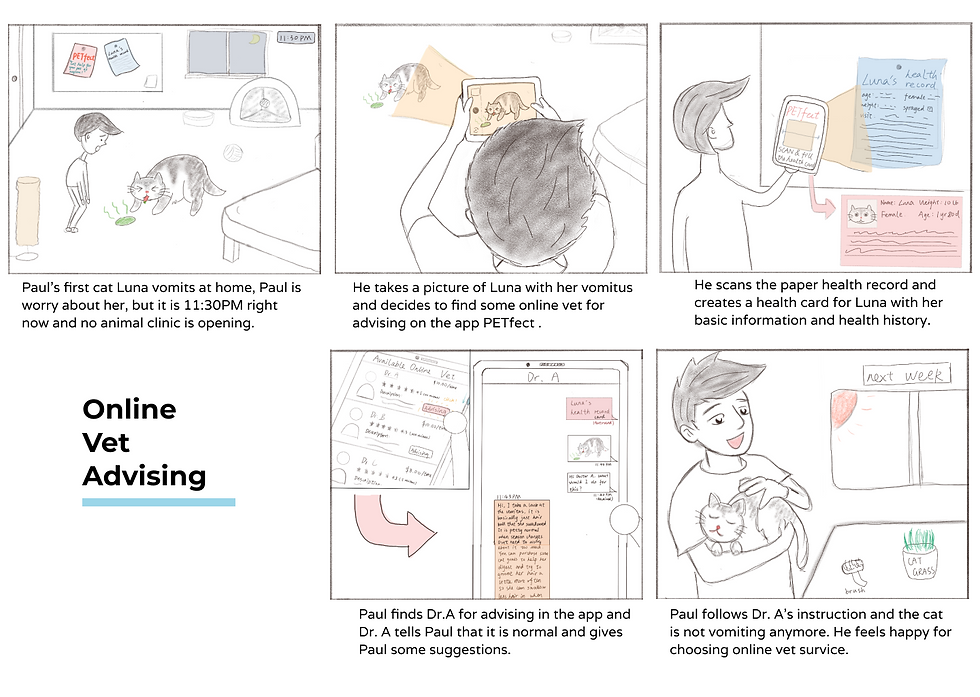
Based on the design requirements our users need, we imagined the different situations our user might face and how they solve the problems with our products. We then conveyed those experiences with storyboards. Each group member created 2 specific storyboards for 2 different scenarios, one hand-drawn and another with photos. These storyboards help us understand emotions and potential problems for our users. We also started to evaluate which values our users paid more attention to and narrowed our final project idea into “Health-related problems”.
Sketchboard Examples


Key Takeaways
-
In this phase, we learned how to communicate our ideas effectively to our readers through sketching. We were able to use color, lines, descriptions, and text box to show our ideas clearly
-
The purpose of storyboarding to convey the user’s emotions and interaction with the product
-
Storyboards are meant to show how the product can address a user need in a realistic context
Interface Sketches
Each person was tasked with creating interface sketches for an idea they are interested in continuing, focusing on the most important features and pages. This allowed each of us to briefly explore different ideas in a way that is quick but still provides a lot of information about how the idea works.
Sketch Examples


Key Takeaways
-
Sketching interfaces requires thoughts on how our users might need a product to function and how will they use it
-
Making interfaces that is easy to understand for the user and have a smooth flow of interaction is important
Information Architecture
Before starting our prototyping process, we created an Information Architecture Sitemap to communicate the high-level components of a system and to show the hierarchical relationship between those components. We reflected back on our research data and gathered the “health-related” ideas from the storyboards and decided to include the online vet advising and smart collar idea as our main features. To make this project more usable, we also added a health record feature to help user collect and manage health information and documents for their pet. This idea-converging step was really important to help us gain a grasp about the visual components and main features that we want to focus on.
Sitemap Evolution


Key Takeaways
-
It is important to identify several main features of our product in this process
-
Layout and relationship of the information require a thoughtful reasoning process
-
It is important to think about what information is necessary for the user which what information is extra.